Image 4.jpg
An official website of the State of Georgia.
The .gov means it’s official.
Local, state, and federal government websites often end in .gov. State of Georgia government websites and email systems use “georgia.gov” or “ga.gov” at the end of the address. Before sharing sensitive or personal information, make sure you’re on an official state website.
Still not sure?
Call 1-800-GEORGIA to verify that a website is an official website of the State of Georgia.
GA@WORK is Live!
SAO webpages are currently being updated as we transition.
July 22, 2026
GA@WORK is off to a strong start – one that has tens of thousands of state employees embarking on a new journey that will modernize the way we work, helping us streamline and automate processes, improve efficiency, and build a stronger foundation for the future.
An important highlight of this milestone was the successful processing of the first GA@WORK payroll on July 15. This was a major accomplishment that tested data accuracy and banking integrations. Georgia is the first state in the nation to successfully implement an enterprise transformation of this scale and complexity, paving the way for transformations across the country.
While the launch of GA@WORK marked a significant milestone, it also represents the beginning of a continuous improvement journey. Over the coming months, optimization will be the focus to refine processes, enhance system performance, and incorporate user feedback to maximize the system’s value. This ongoing commitment to improvement will help ensure GA@WORK continues to evolve in support of the defined objectives and needs of Georgia’s workforce.
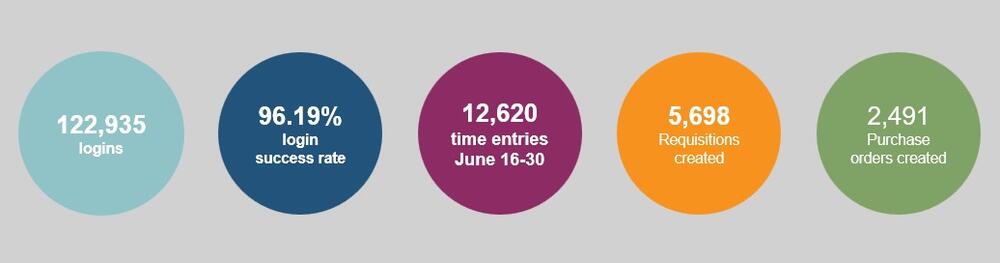
GA@WORK By the Numbers
A look at the first couple of weeks in GA@WORK
GA@WORK launched its first training campaign on July 16. The FY27 Sexual Harassment Prevention Training campaign was distributed to 60,415 employees and people managers, and more than more than 7,700 completions had already been captured as of Friday, July 17.
Note: This training must be completed by June 17, 2027, for current employees. New hires have 30 days from their start date to complete the training.
By now, the terms “Supervisory Organization” (Sup Org) and “Security Role Mapping” (SRM) have been added to your GA@WORK vocabulary, but there may still be some confusion between them. Knowing the difference is key to navigating the system.
Sup Org is the core managerial structure in which workers are grouped under a supervisor or manager. A defined Sup Org drives reporting lines, approvals and HR processes. Throughout July, you can find Sup Org support in HCM Core Office Hours every Mon - Thurs from 10 – 11 a.m.
SRM identifies the functional process and approval access of each employee in GA@WORK. What a user can do within GA@WORK is driven by that individual’s role assignments. Agency Security Partners (ASPs) are an agency’s assigner of roles in the system as driven by requests. The ASPs are invited to Security Office Hours on every Tuesday from 10 – 11 a.m. and Thursday from 2 -3 p.m., July 21 – 31.
Click here to learn more about Office Hours and go-live support.
Starting Aug. 3, participating agencies will be able to access the Adaptive Planning module in GA@WORK. This module assists in the planning and budgeting process.
Adaptive Planning training details are outlined below in the Training Updates section.
The TeamWorks Financial Supply Chain Management (FSCM) system will be available as read-only beginning Aug. 3. Review the following key dates, system availability and what these changes mean for FSCM users.
When is this happening?
Please look for more details via email and in stakeholder meetings such as the GA@WORK Finance Readiness meeting
Training helps users learn how to navigate in GA@WORK and understand how business processes function in the system. On-demand eLearning courses are available now in GA@WORK Learning and can be accessed at any time.
Additionally, Instructor Led Training (ILT) courses will resume in August. The ILT schedule will be published to the Support Portal, and learners will be able to find the ILT sessions under the applicable Learning Programs.
As the Aug. 3 Adaptive Planning go-live approaches, training has started for Budget Analysts, Budget Planners, Budget Managers, OPB Reviewers Enterprise Budget Users to provide a baseline understanding of Adaptive Planning. Following go-live, additional training will be offered over the next few months and in Spring 2027.
An email was sent to CFOs, HRDs and POCs from [email protected] with details and instructions on how to sign up to attend these trainings.
The GA@WORK Training team is hosting a Procure-to-Pay (P2P) End-to-End Demonstration Session Teams webinar on Monday, Aug. 17 from 9 a.m. – 2 p.m.
This demo provides Spend Settlement, Accounts Payable, Buyers/Requesters, Supplier Liaisons, and Business Asset Specialists with an overview of P2P functionality in GA@WORK by walking through key business processes.
The session will provide a complete walkthrough of integrated workflows across Procurement, Accounts Payable, and Asset Management functions. The five-hour session will be broken down into the following key business processes:
The registration link was emailed on Thursday, July 16 from [email protected].
Office hours have been set up to give GA@WORK HCM, Finance, Procurement and Security users a space to ask questions and learn more about GA@WORK processes. Additional Office Hour Sessions have been set up through the month of July:
Click here to view the latest 2026 Learning Labs and Office Hours calendar.
Support with GA@WORK starts in your agency with your Agency Support Team. This team can help troubleshoot common issues by connecting you to available resources.
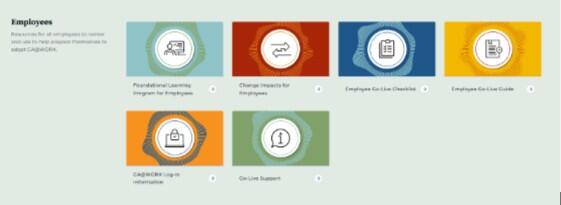
Additional employee resources are available on the GA@WORK Resource Library to help acclimate users to the system over the first 30 days and beyond. Resources like the Employee Go-Live Guide, GA@WORK Log-In Information and Go-Live Support.
The GA@WORK Support Portal is another resource channel for agency functional and administrative users for self-help and information tailored for team members in designated roles. In addition to all the business area-specific resources, many updatedFAQs were recently added in the areas of HCM and Finance. You can access the FAQs by using the Support Portal search bar or find them on every work page.
It’s important to note that the search bar functionality is dynamic. Users can do keyword searches to find Job Aids, FAQs, Managed Documents, and more. Please remember GA@WORK users with Employee Self-Service or Manager Self-Service only roles will not have access to the Support Portal.
While these resources and support channels are available to assist you, remember that it will take some time to gain familiarity and proficiency in GA@WORK. As with any new tool, becoming familiar with its full range of features and nuances takes time. Approach the learning process at a comfortable pace and allow yourself the opportunity to build confidence as you explore.
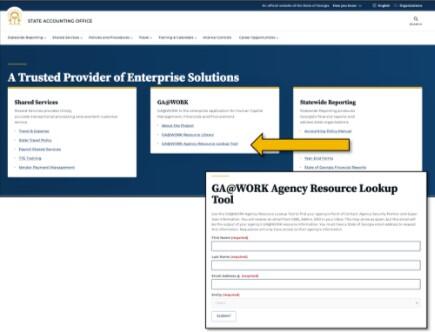
The GA@WORK Agency Resource Lookup Tool provides a convenient way to identify three of your agency’s key GA@WORK contacts: Points of Contact, Super Users, and Agency Security Partner.
The tool is available on the SAO Homepage. To access your agency’s information, complete the online request form. After submitting your request, you will receive an email from 0365_Admin, SAO containing the names and email addresses for those key contacts. Depending on your email settings, the message may be delivered to your spam or junk folder.
Access to the tool is limited to users with State of Georgia email addresses, and requesters my only retrieve information for their own agency.
https://www.surveymonkey.com/r/M7256RM